
Key Levels Help
Prior day, overnight, weekly, opening range, psychological level, label, and termination reference for MX-KeyLevels.
Use Key Levels to load the session map automatically: prior day, overnight, weekly, opening range, and psychological references with consistent termination behavior.
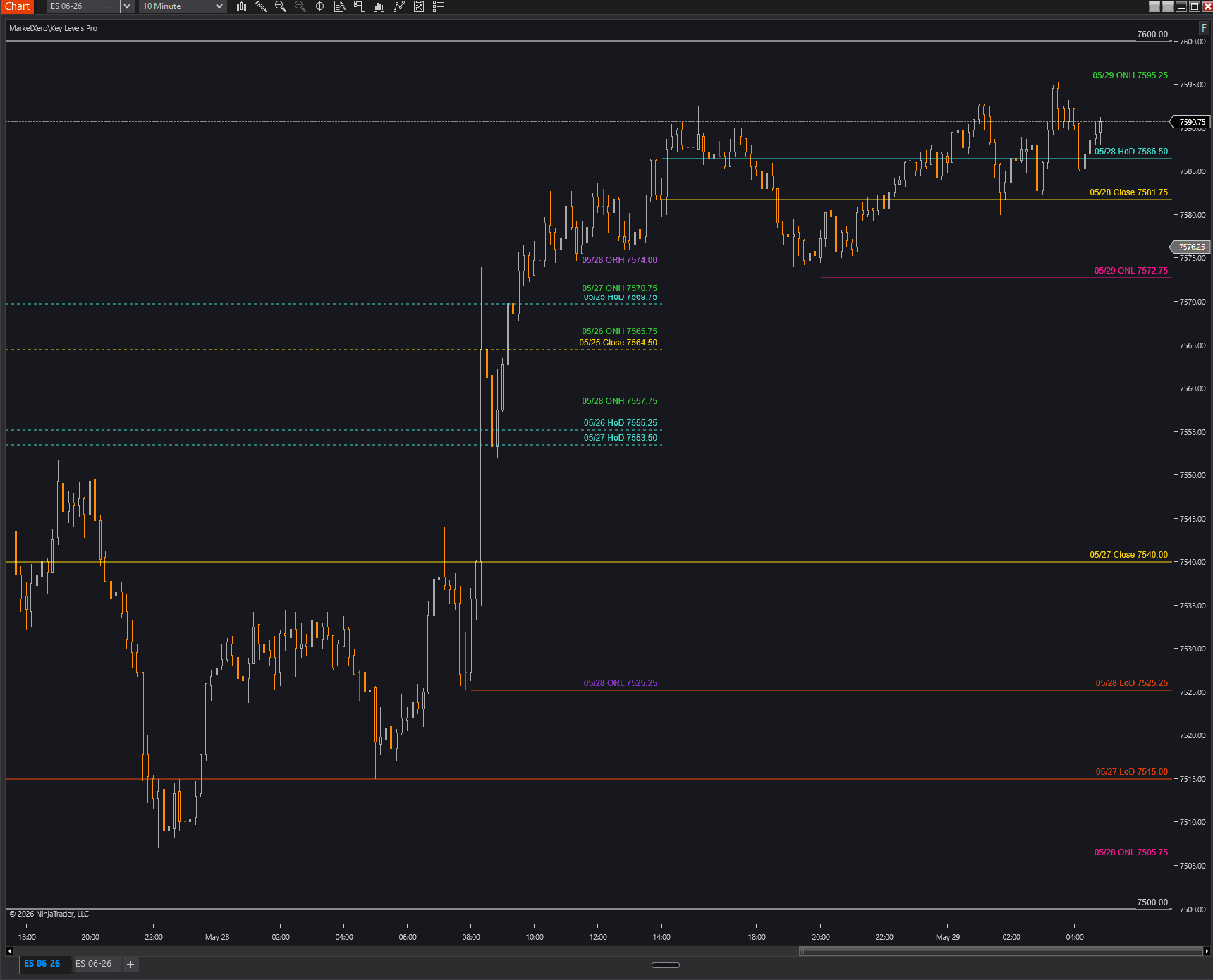
What It Shows
Key Levels is the pre-market structure map. It draws levels that futures traders repeatedly reference, then manages how those levels behave after price touches them.
- HoD and LoD: prior day high and low.
- Close: previous RTH close.
- ONH and ONL: overnight high and low.
- HoW and LoW: previous week high and low.
- ORH and ORL: opening range high and low.
- Opening Range Fill: optional fill between ORH and ORL.
- Psychological Levels: grid levels around a rounded anchor price.
Global Termination
Termination controls how long levels remain extended. Set the global rule first, then override individual level types only when needed.
- 1stTouch terminates immediately when price touches the level.
- TouchRthClose extends to the RTH close if the level is touched during the session.
- AlwaysRthClose always terminates at RTH close.
- AlwaysExtend keeps the level extended indefinitely.
- RTH Only Touch ignores overnight and extended-hours touches when marking a level as touched.
- Touched Line Style changes touched levels to dashed or dotted when the selected rule keeps them visible.
- Opening Range Duration controls how many minutes from the RTH open define ORH and ORL.
Default behavior
The code defaults global termination to TouchRthClose and RTH-only touch to true, so overnight taps do not prematurely mark RTH levels as touched.
Prior Day Levels
Prior day levels give the session its first structural frame.
- Show HoD controls the prior RTH high.
- Show LoD controls the prior RTH low.
- Show Close controls the prior 4:00 PM ET close.
- Each level has its own termination mode, color, line width, touched-line style, opacity, and optional year in the label.
- The indicator uses RTH-aware data series so the close and prior-day references are based on the intended regular session.
Overnight And Weekly Levels
Overnight and weekly levels keep broader structure visible without manual redraws.
- Show ONH and Show ONL draw overnight high and low.
- Overnight tracking uses the 6:00 PM ET to 9:30 AM ET overnight window.
- Show HoW and Show LoW draw previous week high and low.
- Weekly levels are recreated each RTH session start from cached session data.
- Each overnight and weekly level can inherit global termination or use its own rule.
Opening Range
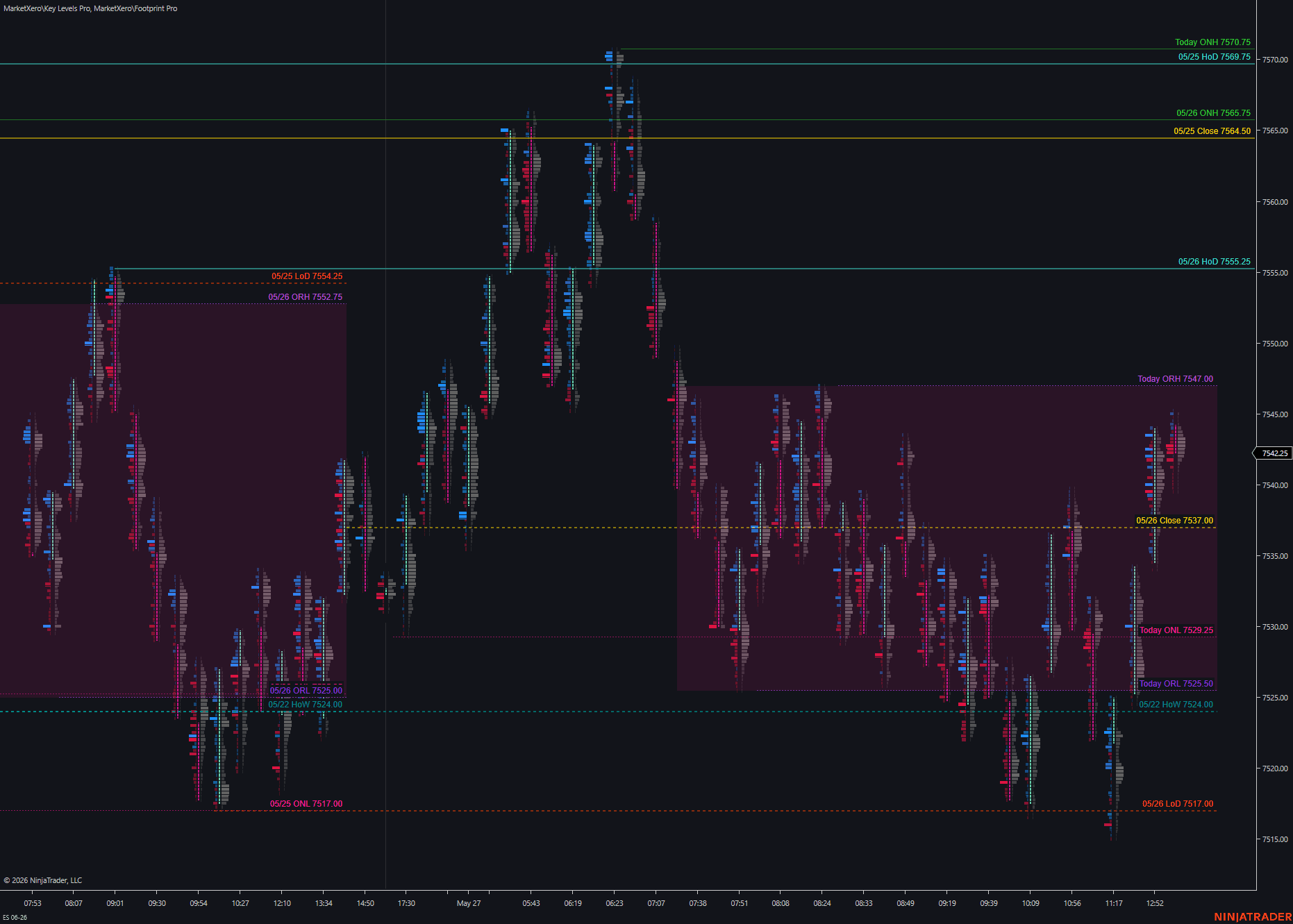
Opening Range levels mark the early RTH range and can optionally shade the range area.
- Opening Range Duration is global and defaults to 60 minutes.
- Show Opening Range High controls ORH.
- Show Opening Range Low controls ORL.
- ORH and ORL default to AlwaysRthClose termination.
- Show Opening Range Fill shades the space between ORH and ORL.
- Fill Duration can use only the OR period or extend the fill to RTH close.
- Fill color and opacity control how much attention the range gets on the chart.
Psychological Levels
Psychological levels build a rounded-price grid around the current anchor.
- Show Psychological Levels enables the grid.
- Increment controls the price spacing, with 100 as the default.
- Levels Above/Below controls how many grid levels draw on each side of the anchor.
- Line color, width, style, opacity, and labels can be configured separately.
- The psych anchor updates around rounded price increments and the lines can AlwaysExtend by default.
Styling And Labels
Every level family has its own styling controls so templates can be readable without every line competing for attention.
- Use higher opacity and width only for the levels your plan actually prioritizes.
- Keep prior day and weekly references visually stronger than optional context if the chart gets crowded.
- Show Labels controls date labels globally.
- Label Font Size controls label readability.
- Individual Show Year toggles help when reviewing historical screenshots or multi-week charts.
Trading Workflow
Key Levels should be loaded before the session plan is written.
- Load the indicator on a clean chart before adding discretionary drawings.
- Confirm RTH and overnight levels match the instrument and session template.
- Decide which levels are trade locations, which are context only, and which should be ignored today.
- Use Footprint or Volume Profile to confirm the response when price reaches a level.
- Save a template after the line weight, opacity, and termination behavior are readable.
FAQ
Short answers for setup and first-use questions.
Why did a level stop extending?
Check the global termination mode first, then the level-specific termination mode. A touched line may terminate immediately, extend to RTH close, or continue depending on that setting.
Can overnight price touch a prior RTH level?
Only if RTH Only Touch is disabled. With the default enabled, non-RTH price action does not mark levels as touched.
How do I change the opening range length?
Change Opening Range Duration in global settings. Common values are 30 or 60 minutes.